K E Y R E S O U R C E S :
p r o t o t y p i n g (link)
• what are we designing?
• examples
• prototype help
• materials and where to buy
• arduino code & coding
• working with the shop (D2FS)
p o s t e r s & v i d e o s (link)
• guide: videos, posters, reports
c o u r s e p o l i c i e s (link)
• my course policies
• consent form for this course
• DEA/HCD statement
c o u r s e c u l t u r e (link)
• design culture
• class organization
• societies, jobs, opportunities
d e s i g n m e t h o d s
• ideation methods:
• Collage; example how to.
• Scenario; example
• Storyboard; ex. 1, 2
• Morphological Chart; example; morphological chart worksheet.
• WoZ
• GIF ex. 1, 2, 3, 4, 5, 6.
by Photoshop, Figma, Gif Maker.
• user study methods:
• Role Playing with a Think Aloud
• Observation
• Heuristic Evaluation
• Survey for UX and Usability (SUS)
• more methods:
• Design Guide
s t u d e n t e x a m p l e s
from all of my classes, to share excellent work. The content of these videos and reports may not align with the specific design challenge for your course. Consider carefully what you need to do specifically for your course in your semester!

ehoura for the ISS [video] [doc]
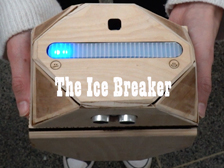
The Ice Breaker [video] [doc]

anima [video] [poster]
haptic desk [video] [doc]

voyager box
[video] [doc]

invisible stations [video] [doc]

infinity wonder box [video] [doc]
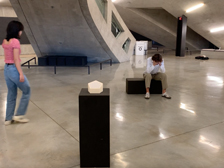
SoundSoul
[video]
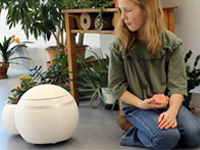
Growbot [video] [pub]
ACM DIS BEST DEMO PAPER

e-MoBo [video] [pub]
IEEE RO-MAN BEST PAPER
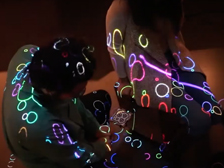
SocialStools
[video]
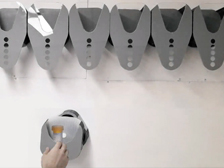
SORT
[video]

pheB [video]
- - - - - - - - - - - - - - - - - - - - - - - - - -
i n s p i r a t i o n :
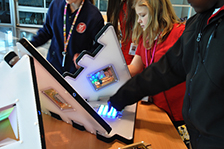 The first cyberPLAYce from my lab, reported in my foundational paper (more here).
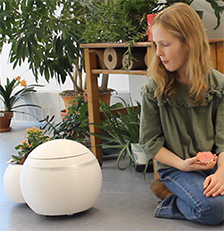
growbot, an outcome from a previous course of mine, aims to encourage children to notice and sustain indoor plant life (more at the bottom of this page).
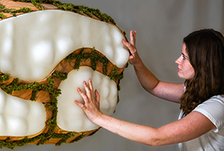
pheB, from my lab, also aims to encourage people to notice and sustain indoor plant life, but targets people of all ages living in tight confines (more here).
|
 |
Designing Robots for CyberPLAYces
D E S I G N S T U D I O
Keith Evan Green, Ph.D. > w h e e l o f n a m e s
TA: [tbd], xxx@cornell.edu to select work to review + critics
Tu. and Th., 2pm-4:30pm, HEB 2L32
C O U R S E D E S C R I P T I O N | D E A 5 2 1 0
As digital experiences can isolate us from physical places and embodied play, familiar environments offer opportunities to reconnect through human-centered robots. Using microcontrollers, sensors, motors, LEDs, and manual and digital fabrication techniques, students design, prototype, and evaluate small robots that foster play, community, and engagement towards establishing CyberPLAYces resonant with our emotional and social lives.
P R E R E Q U I S I T E S | E N R O L L M E N T | Cap of 18 students
Enrollment is limited to 18 students to make full use of the D2FS shop and staff.
Requires professor's permission by email. DEA majors must have completed two DEA studio courses at the 2000 and 3000 level.
Preference is given to student in my affiliations: DEA, FSAD, MAE, IS, and Robotics.
This course is for 3 credits, for letter grade only. There is no final exam.
No prior coding or electronics experience is necessary to do well in this course.
S Y L L A B U S | S E E A L S O M Y D E A 6 2 1 0 a n d D E A 2 7 3 0
---------------------------------------------------------------------------------------------------------------
N O D E V I C E S P O L I C Y - - - - - - - - - - - - - - - - - - - - - - - - - - - - - - - - - - - - -
The use of phones, tablets, and laptops is prohibited in class except for class activity focused on Arduino prototyping when laptop-use is required. Leave your mobile phones in your backpacks and be with us; you'll be more engaged and do better in this course. The evidence for this is clear. If you have an exceptional need for using these devices in class, talk to me about it.
L E A R N I N G O U T C O M E S - - - - - - - - - - - - - - - - - - - - - - - - - - - - - - - - - - - - -
Outcome 1: To grapple with under-constrained, “wicked” problems and opportunities of living on this planet.
Outcome 2: To demonstrate an ability to design, prototype, and evaluate full-scale, small robots responsive to these problems and opportunities, and present them in a video.
Outcome 3: To demonstrate, in a written report, an ability to communicate the motivations for, and iterative development of small robots that shape playful places, as well as assess their shortcomings.
This studio course is designed to guide you in designing meaningful responses to particilar life challenges while encouraging exploration of who we are, how we engage with the world, and our place within it.
"In order to understand things, we have to build them."
– Ruzena Bajcsy, a founder of modern robotics.
F O U N D A T I O N - - - - - - - - - - - - - - - - - - - - - - - - - - - - - - - - - - - - - - - - - - - - - - - -
As the boundary between physical and digital worlds blurs, there is a need for new digital tools and physical environments to support everyday cyber–physical interaction.
This studio focuses on designing and building technologies—small robots—that do more than serve practical purposes: they foster play, community, and engagement while helping establish what I call "CyberPLAYces."
A CyberPLAYce combines digital tools and physical environments to create cyber-physical places resonant with our emotional and social lives.
My foundational paper, cited below, elaborates on the motivations and theories anchoring a design exemplar of a CyberPLAYce:
Soleimani, A., Herro, D., Green, K. E., and Walker, I. D. 2019. “CyberPLAYce – A Tangible, Interactive Learning Tool Fostering Children’s Computational Thinking through Storytelling." International Journal of Child-Computer Interaction, Elsevier, 20C, pp. 9-23. https://doi.org/10.1016/j.ijcci.2019.01.002
This studio aims to expand this design space, recognizing that, while our world is increasingly digital, it can also remain grounded in physical environments that enable embodied, social and emotional life.
R E A D I N G S - - - - - - - - - - - - - - - - - - - - - - - - - - - - - - - - - - - - - - - - - - - - - - - - - - -
There are no assigned readings for this course, but the readings listed below lay an intellectual foundation for what we do in this studio.
• Paul Dourish. Embodied Interaction. MIT Press, 2001.
• Steve Dow. Wizard of Oz Interfaces [WOZ].
• Jen Golbeck. Back off, man. I’m a scientist.’Using Fiction to Teach Beginners HCI.
• Kristina Höök. Affective Interaction.
• Hiroshi Ishii. Tangible Bits and Radical Atoms: Beyond Tangible Bits.
• Bruce Mau. An Incomplete Manifesto for Growth.
• John McCarthy and Peter Wright. Technology as Experience. MIT Press, 2004.
• William J. Mitchell. Computers for Living In, from e-topia. MIT Press, 1999.
• Nicholas Negroponte. Soft Architecture Machines. MIT Press, 1970.
• Richard Picard. Affective Computing. MIT Press, 1997.
T H E P O W E R O F A S M A L L C L A S S - - - - - - - - - - - - - - - - - - - - - - - - -
Unlike a large lecture class at Cornell, this small class offers a unique opportunity for meaningful conversation, discovery, and collaboration. Don’t miss out on this chance to engage! To ensure attendance, a sign-in sheet will be available during the first ten minutes of each session. Additionally, a significant portion of your grade will be based on your active participation in collaborative learning and discovery (in part, by evidence of written peer evaluation).
C L A S S O R G A N I Z A T I O N - - - - - - - - - - - - - - - - - - - - - - - - - - - - - - - - - - - -
This is a studio course. As such, most of our classes together involve: (a) student updates on developing work, and (b) students working on assignments in class, supported by the resources available (i.e., the instructors and the shop staff and their facilities).
A typical class follows this sequence:
0. Ahead of each class session, each student (for assignment 1) or student team (for assignment 2) will present status reports and demos on their design activities, as per the weekly schedule (below) under the heading, "In class." Your status report can be a physical model, a powerpoint slide, a digital image (e.g., a 3D model), a Word document, or any other document that communicates the status of design development. For demos, you share your current physical prototype and you take a smartphone video of your working prototype and upload the video (or a URL to it) to our shared folder. (Sharing the video is a good approach, as robotics demos often fail!) Reports and video-demos are uploaded to the shared class folder ahead of class presentations.
1. At the start of class, the professor will make announcements (if any) and present pertinent content (if any for that given class session)
2. Each student or student team will offer a brief update on their developing work and ask for class input. If students in the room fail to volunteer their input, one or more students will be called upon to offer their input as selected by the wheel of names. The quality of input and attendance will largely be the basis of the participation grade.
3. Following the status reports by students, the professor and TA will work with each student or student team to help develop their work.
About class organization, more broadly, please also review course culture: link.
S C H E D U L E B Y W E E K - - - - - - - - - - - - - - - - - - - - - - - - - - - - - - - - - - - - - - -
SHOP TRAINING: We will also do D2FS shop training to learn how to use the basic power tools safely. Please come to this training session with close-toe shoes (no sandals) and something to tie-back long hair if you have long hair!
STUDENT CRITICS: Each class session, a student critic-of-the-day will be selected randomly to offer feedback on developing work from other students or teams. This is a critical aspect of this course: we learn from each other!
METHODS: See top-left of this page for more on the human-centered design methods identified below (e.g., scenarios, ...)
BRING A LAPTOP AND GROVE KIT TO CLASS, ALWAYS!
Week 01.20 | Course Intro | ASSIGNMENT-1 Intro
> Review syllabus; introduce Assignment-1; D2FS training; get Grove to work; B. Mau.
Week 01.27 | Ideation: design methods
> Tu Review ideation methods--this page, top-left; Iterate design with the morphological chart worksheet, identifying 3 prototypes.
> Thrs Write a scenario; prototype using Grove.
Week 02.03 | 3 Exploratory Prototypes [due Thrs: 5 pts]—rubric.
> Tu Advance your three designs for DEMO DAY
> Thrs DEMO DAY; upload one slide with 3 quick phone-video demos of 3 prototypes identified in your moprhological chart; present your slide in class for feedback.
Week 02.10 | Prototype development
> Tu Review morphological charts and demo prototypes.
> Thrs Review 'model' reports & videos; upload a video demo to shared folder for Tu.
Week 02.17 | Refined Prototype demo [10 pts]. | Cornell Break Tuesday
> Tu DEMO DAY. Play role(s) of your scenario.
> Thrs Develop videos and reports.
Week 02.24 | Assignment-1 videos & reports [due Tu: 15 pts & 5 pts]
> Tu Review videos; Intro Assignment-2; Everyone does a GIF concept for nex class.
> Thrs: Review GIFs; form teams; meet your team; complete a team charter.
Week 03.03 | Storyboard and Morphological Chart (team effort hereon)
> Tu Develop design with storyboards (ex. 1, 2).
> Thrs Develop design with the morphological chart worksheet.
- - - - - your storyboard should make clear how your design and people interact,
for what purpose(s), where, at which times of day, for whom. - - - - - - - - - - - - - -
Week 03.10 | Exploratory Prototype demo [5 pts]
> Tu> DEMO DAY; complete a peer evaluation; upload a quick phone-video demo.
> Thrs Review storyboards and morphological charts; teams pick components to order.
Week 03.17 | Prototype development
> Tu Demo prototypes; review other user study methods (top-left).
> Thrs Design development.
Week 03.24 | Prototype development
> Tu Demo prototypes.
> Thrs Design development.
- - - - - your design concept should be clear; time to laser-cut, 3D-print, order stuff - - - -
Week 03.31 | Cornell Break
Week 04.07 | Concept Validation Prototype [due Thrs: 10 pts]
> Tu Design development.
> Thrs> DEMO DAY; complete a peer evaluation; upload a quick phone-video demo.
Week 04.14 | Prototype & video development
> Tu Demo doing a role play; more about videos.
> Thrs Design development.
Week 04.21 | Prototype & video development
> Tu Demo with think aloud.
> Thrs Design development.
Week 04.28 | Prototype & video development
> Tu Demo; do a UX Survey (SUS; how to score it).
> Thrs Design development.
Final Class 05.06 | Refined Prototypes, Assignment-2 [10 pts].
> DEMO DAY; complete a peer evaluation; upload a quick phone-video demo.
DEADLINE: 05.14 at 12pm [25 pts].
Upload all final deliverables to our shared folder for grading by date/time announced each semester by Cornell U. Registrar as offered here.
A S S I G N M E N T S - - - - - - - - - - - - - - - - - - - - - - - - - - - - - - - - - - - - - - - - - - - - - -
There are two assignments for this course.
The first assignment, undertaken by each student, is intended to be a fast-paced engagement.
The second assignment is undertaken by teams of 2-4 students and provides a longer, deeper development of the design following a trajectory like this:
- Conceptualization
- Prototyping / Rapid, low-fidelity
- Concept Generation: GIF, Scenario, Morphological Chart, Storyboard
- Prototyping in Hardware and Software
- User Testing
- Video Making and Reporting
- Documentation
Team composition for the second assignment will be formed by the instructor(s) based partly on proposals pitched in class by class members.
Keep in mind: this course asks you to develop interactive, physical artifacts that have at least one input and one output which moves physical mass.
- - - - - - - - - - - - - - - - - - - - - - - - - - - - - - - - - - - - - - - - - - - - - - - - - - - - - - - - - - - - - - -
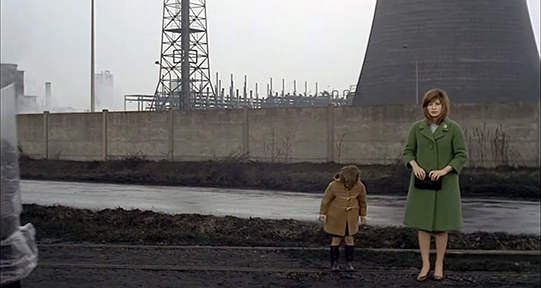 A stillframe from Michelangelo Antonioni's Red Desert (Il deserto rosso, 1964),
Introduction to this semester's assignment:
Industrial Landscapes, Living Systems: Robotics to Help Children Learn About and Care for the Environment
Over the past century, industrialization has both benefited and harmed society. It has expanded material comfort, transportation, communication, medicine, and the ability to produce housing, food, energy, and everyday goods for large populations. Yet it has also polluted air, water, and soil; warmed the planet, and changed weather patterns; depleted natural resources; exposed workers and nearby communities to unsafe conditions; and, in some places, contributed to physical illness, stress, anxiety, and social isolation.
Red Desert (Il deserto rosso, 1964), directed by Michelangelo Antonioni, asks us to attend to the harmful effects of industrialization: not only what an industrial landscape releases into the environment, but especially what it can do to the emotional lives of people who must inhabit it. Antonioni's film follows Giuliana, a young mother, and her son Valerio as they attempt to navigate the alienating industrial landscape of postwar Italy.
At the end of the film, mother and child stand beside the petrochemical plant in the town where the live. Valerio grasps a valve wheel emerging from the ground, near a pipe that releases steam violently at irregular intervals, and asks why it does that.
Giuliana: I don’t know.
Valerio: Why is that smoke yellow?
Giuliana: Because it’s poisonous.
Valerio: But if a little bird flies over there, does it die?
Giuliana: The little bird knows, by now, not to go over there anymore.
Giuliana’s answer is unsettling. It suggests that both birds and people are left to adapt to poisonous industrial emissions, while the industrial landscape that produces them goes on unchanged.
In the United States and around the world, chemical-plant emergencies, gas leaks, and industrial explosions regularly appear in the news. In 2026 alone, incidents covered include:
- “Toledo Chemical Leak That Forced Residents to Evacuate”
Toledo, Ohio (NYT: October 21, 20260
- “Toxic Explosion Feared at California Chemical Plant”
Garden Grove, California (NYT: May 22 and 25, 2026)
- “2 Are Dead After ‘Chemical Emergency’ at a West Virginia Plant”
Nitro, West Virginia (NYT: April 22, 2026)
- “11 Dead as All Bodies Recovered After Washington Chemical Explosion”
Washington State (NYT: May 30, 2026)
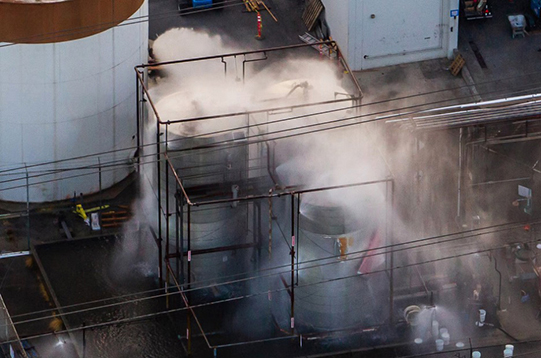
Chemical Exposion in Garden Grove, CA (NYT, 2026).
Today, widespread data-center construction is creating another form of industrial expansion. Data centers can produce adverse noise, light, air, water, and energy impacts for nearby communities. Their rapid growth has prompted concerns about hearing loss, stress, sleep disruption, diminished quality of life, and environmental burdens placed on surrounding neighborhoods. Studies cited by The New York Times estimate that pollution associated with data centers in the US may contribute to roughly 1,300 premature deaths and hundreds of thousands of asthma cases each year (October 1, 2026). As one might expect, public opposition to new data-center development has been forceful, as reported here:
- “Why Americans Hate Data Centers”— NYT: Sept. 15, 2026
- “The Data Center Backlash Bursts Into the Midterms”— NYT: Aug. 23, 2026
- “What the Data Center Boom Looks Like From the Sky”— NYT: Oct. 5, 2026
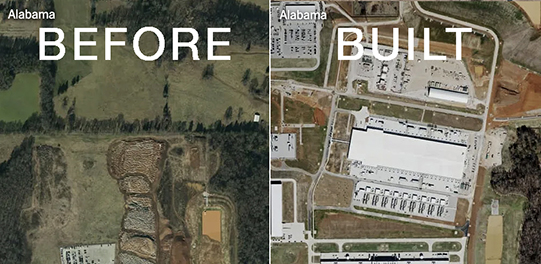
A site before and after a data center was constructed (NYT, 2026).
In this design studio, the two project assignments are motivated by the harmful effects of industrialization—effects now intensified by the rapid expansion of data centers.
The two assignments are cousins: the first asks you to make industrial harm perceptible by way of a robotic installation; the second asks you to design robotics in support of nature, care, and environmental stewardship.
Assignment-1 (40% of the course grade; individual effort)
A Robotic Wall that Helps Children Learn About the Harms of Industrialization
Each student will design and build one robotic unit: a wooden box measuring 16 in. × 16 in. × 6 in. Each unit will become one building block in a collectively assembled, reconfigurable wall. As a class, we will arrange these building blocks into wall-formations for exhibition.
Your unit should evoke an industrial environment and its effects on bodies, minds, and ecosystems. Your unit may include openings through which viewers can see into its interior, or through which light, sound, air, or moving elements can emerge. The robotic units should offer abstract evocations of the noises, sounds, and visible air pollutants using motors, LEDs, and audio outputs—not suggest, literally, the pipes, vents, smokestacks, conveyors, and other forms of infrastructure of an industrial facility.
The wall of units should be designed for elementary- and middle-school students as a learning too. Children will be able to approach, activate, and retune the robotic units to express their own understandings of pollution, industrial infrastructure, and environmental harm.
Each robotic unit must include:
- sensing of a visitor’s presence, movement, sound, touch, or other input;
- light/color output;
- sound output; and
- physical movement driven by the servo.
The movement component must do meaningful architectural or expressive work. It should visibly change the robotic unit’s physical state—for example, by opening a shutter, moving a vent, shifting a surface, releasing or concealing light, activating a mechanical sound, or changing the unit’s form. The goal is not simply to add a moving decoration, but to make the unit a small robotic component of a larger responsive environment.
Limit yourself to using only the Grove electronics and box panels provided. Ensure that the battery and all electronics fit inside the box, and that the battery is accessible for recharging. If you want to replace any wood panel with another material or otherwise modify them with engraving or cut-outs, generate your cut-files using a suitable program (e.g., Adobe Illustrator, AutoCad, SketchUp, CaseMaker) and work with the D2FS to have these cut. Don't make the mistake of creating a prototype that is not meticulously designed and fabricated; prototypes that look like craft projects will receive low grades.
You do not have to generate code on your own: you can select one of the codes provided under my “Arduino Codes You Can Copy & Paste” (link), An effective way to tailor your code to your wants without coding experience is to use ChatGPT as described in the linked page.
Finally, in addition to my foundational paper on CyberPLAYce referenced above, this paper may offer inspire your thinking:
Schneider, J. L., and Iverson, J. M. 2015. “Building Spaces for Play: Mothers’ Design of the Home Environment for Pre-Walking and Walking Infants.” Infant Behavior and Development, 39, pp. 79–89. https://doi.org/10.1016/j.infbeh.2015.02.004
- - - - - - - - - - - - - - - - - - - - - - - - - - - - - - - - - - - - - - - - - - - - - - - - - - - - - - - - - - - - - - -
Assignment 2 (45% of the course grade; individual effort)
Growing Together: Child–Robot Partnerships for Plant Care
The second assignment moves in the opposite direction. Rather than conveying industrial harm, you will design a small robot that brings an evocation of nature into a school building that supports the care of living plants within it.
Working in groups of two to four, you will build a robot that shares responsibility for plant care with child-partners in an elementary or middle school. The robot may monitor plant conditions, invite watering or observation, communicate changes in a plant’s needs, create routines of care, or otherwise encourage children to notice and sustain indoor plant life.
The robot may take many forms and exhibit many kinds of behavior. It may use sensing, movement, light, sound, and/or AI vision. However, its central purpose must be clear: it should invite children into a relationship of care with plants and with the more-than-human world.
The aim is not for the robot to replace children’s care of plants. Rather, the robot should be a collaborator: one that helps plants thrive while cultivating attention, responsibility, curiosity, and environmental stewardship in children.
G R A D I N G / G R A D I N G R U B R I C - - - - - - -- - - - - - - - - - - - - - - - - - - - - -
Please review carefully the Course Policies (link). These policies are not negotiable except under grave circumstances.
Throughout this course—an intimate and intensive “conversation” across students and the professor— students will have ample opportunity to receive feedback on their work. Here is rubric for the two major assignments.
The list that follows names and describes the graded components for this course. Each component is worth so many points, as shown in red type. The sum of all of these components equals the final grade of 100 points. The numerical scale for grading is as follows: A+ (98–100), A (93–97), A- (90–92), B+ (88–89), B (83–87), B- (80–82), C+ (78–79), C (73–77), C- (70–72), D+ (68–69), D (65–67), D- (below 65).
• ATTENDANCE + PARTICIPATION | 15 points
DEA 5210 is intentionally designed as a low-enrollment course to foster a dynamic classroom experience centered on discovering together. As a result, each student’s active contribution to this shared exploration is a significant component of the final grade. For a broad description of what constitutes active participation, Review "P1" of the course policies (link). Practically, at the discretion of the instructor and teaching assistant (if any), up to 15 points will be awarded for these criteria:
- ATTENDANCE taken by the instructor or TA.
- CONTRIBUTIONS TO CLASS, especially when your work is selected for review in-class, when you are asked to be one of the two "critics-of-the-day" that critique the work of your peers, or you are assigned to present a case study in class.
- YOUR PEER REVIEW offered anonymously by team members using this peer evaluation form.
Active participation requires being present, prepared, and engaged when called upon. Your participation grade will be negatively impacted by repeated unexcused absences, unresponsiveness in class, and persistent distraction from phones, devices, or off-topic conversations.
• ASSIGNMENTS [rubric] | 40 points (A-1) & 45 points (A-2)
- EXPLORATORY PROTOTYPE [5 points]
A rough prototype demonstrating early technical feasibility and exploration of design directions. Focus is on getting things moving, sensing, or communicating—however imperfectly—rather than polish or completeness.
- CONCEPT VALIDATION PROTOTYPE [5 points] for assignment-2 only
A more refined prototype that clearly demonstrates the core interaction concept. It shows that the main design idea is viable, with key functions working well enough to evaluate and iterate further.
- REFINED PROTOTYPE [10 points]
A near-final prototype demonstrating technical completeness and design maturity. Focus is on reliability, usability, and responsiveness to earlier feedback. Should be testable with real users or stakeholders.
- VIDEO [my guide] [15 points] communicates a full, cohesive story of your designed, interactive artifact, answering why, for whom, where, and for what purpose. Upload to our shared folder an MP4 file reduced to < 30MB using, e.g., Handbrake (see my video guide). In your Documentation, include a URL link to your video uploaded to Vimeo or YouTube. The video will otherwise adhere to the requirements for a Video Showcase submission to the ACM conference, CHI, a benchmark for design research. (Videos from a previous Video Showcase.)
- REPORT (pdf) [10 points] that includes every aspect listed in my grading rubric. Upload your REPORT to our shared drive as a print quality pdf document. These examples from previous classes are model reports (1, 2, 3, 4) but they may not contain every requirement in my linked grading rubric. My grading rubric offers the most current expectation for documenting your design.
|
 |